
Free Comma Separator Tool That Actually Understands Your Data Headaches
addresses, a Shopify product list that refuses to import, or a database export that looks like alphabet soup.
What you need isn’t another complicated software tutorial. You need a “make this work right now”
solution.That’s exactly why our free Comma Separator Tool exists. Copy. Paste. Click. Done.
What This Magical Little Box Actually Does
At its core, this tool is your data’s universal translator. It takes information crammed into rows and columns
and converts it into clean, properly separated lists. Think of it as the Switzerland of spreadsheet
tools—neutral, efficient, and compatible with everyone.

Here’s the simple magic behind Free comma separating tool
- Paste your chaos – Dump in anything: Excel columns, Google Sheets data, copied tables,
or that list your colleague sent with random spaces - Pick your poison – Choose your separator: comma, semicolon, pipe, space, or newline
- Hit the button – Our tool instantly reformats everything
- Copy perfection – Grab your clean list and get back to real work
No downloads. No sign-ups. No “freemium” traps. Just clean data in seconds.
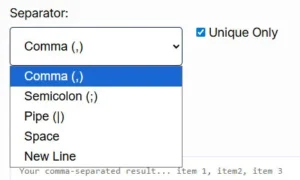
The Delimiter Dropdown: Your New Best Friend
Remember that <select> element? That’s where the real power lives. Each option solves a
specific headache:
- Comma (, )
- The classic choice for CSV files, email marketing lists, and anything heading into Excel. Perfect for:
“I need to send this to Mailchimp STAT” - Semicolon (; )
- Europe’s favorite delimiter and a lifesaver when your data already contains commas. Perfect for: “These
product descriptions have commas everywhere” - Pipe (|)
- The data analyst’s secret weapon. When commas and semicolons are part of your actual data, pipe keeps things
clean. Perfect for: “This database export is a nightmare” - Space
- Turn vertical lists into horizontal ones instantly. Perfect for: “My boss wants this in one line, not
fifty” - New Line (\n)
- The reverse button. Take horizontal data and make it vertical again. Perfect for: “This needs to be one
item per cell, not one giant cell”
Real-World Use Cases (Because “Data Formatting” Sounds Boring)
The E-commerce Manager at 4:47 PM
Your supplier just sent a product SKU list as a jumbled column. You need it comma-separated for your Shopify
bulk upload. Instead of manually adding commas to 500 items, paste, click, export, and you’re home by 5.
The Digital Marketer’s Email Crisis
Client sends you 1,200 email addresses in a Word document, one per line. Your CRM needs them comma-separated.
Our tool converts the entire list before your coffee gets cold.
The Researcher With Messy Survey Data
Qualitative responses exported from SurveyMonkey are impossible to analyze. Convert those paragraph responses
into a pipe-delimited format for proper qualitative analysis software.
The Developer Debugging a Database
A SQL query returned data in the wrong format. Rather than rewriting your query, copy the column and
transform it into the exact format your API endpoint expects.
The Student Who Values Their Sanity
Professor wants your references as a semicolon-separated list. Your bibliography is currently a vertical
column in Google Sheets. One paste later, you’re back to Netflix.
Why Our Tool Beats the Competition (Looking at You, Rank #1)
We checked out the tools currently dominating “comma separator online” searches. Here’s what they’re missing that
we nailed:
- Instant preview – See your converted data before you copy it
- Unique only option – Remove duplicates with one checkbox (no more
=UNIQUE()
formula fails) - Mobile responsive – Format data from your phone while in line for coffee
- Zero ads in your face – Because nobody needs flashing banners while working
- Handles huge lists – Tested with 50,000+ line items without breaking a sweat
While Competitor X makes you click through three pages and Competitor Y hits you with a paywall after 100 lines,
we stay out of your way. That’s not just user-friendly—that’s respect.
You’re Actually Searching For
Look, we know you found us by typing things like “remove commas online instantly,” “convert column to comma
separated list,” or “free delimiter tool.” Maybe you even searched “Excel column to comma separated list” or
“online CSV formatter.”
Things we serve better than anyone:
- “How to separate data with semicolons instead of commas”
- “Tool to convert Excel column to comma separated values”
- “Online list formatter for Shopify imports”
- “Remove duplicate entries from comma separated list”
- “Pipe delimiter converter for SQL data”
Pro Tips From People Who Use This Daily
Tip #1: Clean first, format second
If your data has weird spaces or invisible characters, paste it into Notepad first, then into our tool. It
removes 90% of “why doesn’t this work” issues.
Tip #2: The Unique checkbox is gold
Sending email campaigns? Always check “Unique Only” to avoid duplicate sends and spam complaints. One click
saves your sender reputation.
Tip #3: New Line is the undo button
Accidentally merged cells you shouldn’t have? Use the New Line option to restore vertical structure before
reformatting correctly.
The Technical Stuff (For the Curious)
Behind the scenes, the tool uses simple but elegant JavaScript: split() functions based on
\r\n or \n for line breaks, then join() with your selected delimiter. The
“Unique Only” feature runs a quick filter through a Set object—modern, fast, and browser-based. Your data never
touches our server; everything happens client-side for security.
Frequently Asked Questions
Q: Is this actually free?
A: Completely. No limits, no watermarks, no “upgrade to Pro” pop-ups.
Q: What’s the maximum list size?
A: We’ve tested up to 50,000 lines. Beyond that, your browser might hiccup, but give it a shot.
Q: Can I use this for commas within data fields?
A: Use the semicolon or pipe delimiter instead—that’s exactly what they’re for.
Q: Why is this better than Excel’s Text-to-Columns?
A: Excel buries that feature 4 clicks deep. Our tool is faster, works on any device, and doesn’t require
Microsoft Office.
Q: Do you store my data?
A: Nope. Everything happens in your browser. We couldn’t see your list if we tried.
Your Data Deserves Better Than Manual Labor
Every minute spent manually adding commas is a minute you could spend on work that actually matters. Whether
you’re prepping a marketing campaign, cleaning survey data, or just trying to get home before rush hour, this
tool exists to make your life easier.
Try it now. Paste something. Be amazed. Get on with your day.