Table of Contents

Why Accessibility Matters and How to Create Truly Inclusive Websites
When we talk about modern web development, most discussions revolve around performance, UI trends, frameworks, or search engine rankings. But there’s a powerful aspect that often gets far less attention than it deserves—web accessibility. In an online ecosystem where billions of people interact daily, accessibility is not just a “nice-to-have.” It is a vital part of building digital spaces that work for everyone, regardless of ability, device, or environment.
As website owners and developers, we often assume users will interact with pages exactly the way we do: with a mouse, a large screen, full visual clarity, and stable internet. But the reality is very different. A massive portion of the global audience relies on screen readers, voice commands, keyboard navigation, zoomed interfaces, and alternative input devices to simply use the web.
This is where accessibility tools step in. And if you’re looking for a fast way to improve compliance, readability, and usability, the HTML Accessibility Enhancer from ToolsInFree becomes incredibly valuable.
You can explore it here: https://toolsinfree.com/html-accessibility-enhancer/.
In this blog, we’ll break down the “why” and the “how” behind accessibility, explore common mistakes, and show how tools like the Accessibility Enhancer can help you create cleaner, more inclusive HTML instantly.
What Is Web Accessibility, and Why Should You Care?
At its core, web accessibility means designing websites that can be used by people with a wide range of disabilities—including visual, hearing, motor, and cognitive limitations. Accessibility also benefits people without disabilities, such as users with slow internet, small screens, broken mouse devices, or temporary injuries.
Here’s why accessibility matters more today than ever:
1. The Internet Is for Everyone
Over 16% of the world’s population lives with some form of disability. That’s more than one billion people. If your website isn’t accessible, you’re automatically excluding a huge audience who want to engage with your content or service but cannot.
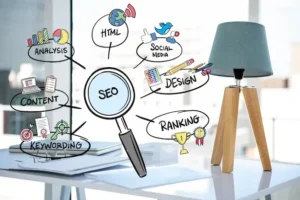
2. It’s Good for SEO
Search engines like Google favor websites that are well-structured and user-friendly.
HTML accessibility improvements—like proper heading hierarchy, alt text, semantic tags, and ARIA attributes—help search engines understand your site better.
In many cases, accessibility and SEO overlap in surprising ways.
3. You Reduce Risk of Legal Issues
Across the globe, accessibility standards like WCAG, ADA, and EN 301 549 are becoming increasingly strict. Businesses that ignore them risk facing lawsuits, penalties, or government enforcement.
4. It Improves Your Website’s User Experience
Accessible websites load faster, work better on mobile, and are easier to navigate. Even users without any disabilities benefit from cleaner design and structure.
5. It Builds Brand Reputation
A brand that respects inclusivity stands out. People appreciate when a company shows that it values all users—building trust and long-term loyalty.
Common Accessibility Issues Found on Most Websites
Even skilled developers unknowingly make accessibility mistakes because they are easy to overlook. Let’s explore some of the most common issues and why they matter.
1. Missing or Poorly Written Alt Text
Screen readers rely on image descriptions to “speak” image content aloud. Without alt text, visually impaired users miss out on important context.
2. Heading Tags Out of Order
A page that jumps from an <h1> to an <h4> can confuse assistive technologies, making the content feel disorganized or misleading.
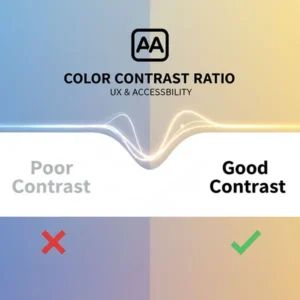
3. Low Color Contrast
If text blends into the background, it becomes unreadable—not only for people with visual impairments but also for users outdoors or on low-quality screens.
4. Links Without Meaningful Context
Buttons or anchors labeled “click here” create confusion when heard through screen readers. Users need a clear description of where the link leads.
5. Missing Labels on Forms
Forms are one of the biggest culprits of inaccessibility. Without labels or ARIA tags, filling them out becomes extremely difficult.
6. No Keyboard Navigation Support
If a user cannot tab through your website, large portions of your visitor base are immediately locked out of using it.
7. Incorrect or Missing ARIA Roles
ARIA is incredibly powerful when used correctly but can break accessibility when misapplied.
8. Excessive Use of Non-Semantic Tags
Relying solely on <div> and <span> to structure pages prevents assistive tech from understanding the content’s purpose.
These issues can be hard to spot manually, especially for large websites. That’s where automated accessibility enhancement tools come in.
How the HTML Accessibility Enhancer Helps Fix These Problems
The HTML Accessibility Enhancer offered on ToolsInFree is designed to simplify the entire process. You can paste your HTML code, and the tool analyzes and enhances it based on modern accessibility standards.
Here’s what makes it powerful:
1. Automatic Semantic Tag Improvements
The tool restructures poorly formatted HTML, improves heading hierarchy, and ensures meaningful use of HTML5 semantic elements.
2. Adds or Suggests Missing Alt Tags
If your images lack alt text, the tool identifies them and provides a placeholder or suggestion.
3. Enhances ARIA Labels and Roles
It helps make elements screen-reader-friendly by adding appropriate ARIA attributes when needed.
4. Highlights Color Contrast Issues
While not changing your design, it alerts you to color combinations that may violate WCAG contrast guidelines.
5. Cleans Up Code for SEO
Cleaner, structured HTML helps search engines interpret your website more accurately.
6. Improves Readability
Developers often struggle with messy markup, especially on older websites. The enhancer tidies up code so it’s easier for humans to maintain.
If you want to try it out, you can test your code on the tool here:
https://toolsinfree.com/html-accessibility-enhancer/
Why Manual Accessibility Improvement Isn’t Always Enough
You might wonder, “Shouldn’t developers handle accessibility manually?”
Ideally, yes. But manual accessibility fixes can be time-consuming and sometimes overlooked. Consider these situations:
1. Large Websites with Hundreds of Pages
Fixing accessibility on every page, every button, and every image manually can take weeks or even months. Automation can accelerate the process.
2. Legacy Websites
Older sites often use outdated HTML, inline styling, and non-semantic structure. Tools help modernize the markup quickly.
3. Developers Under Tight Deadlines
A project might be rushed. Accessibility might get pushed to later phases and be accidentally forgotten.
4. Teams Without Accessibility Expertise
Not every team includes an accessibility specialist; tools provide guidance and corrections that developers might miss.
5. Hidden Issues
Some accessibility issues aren’t obvious until assistive technologies reveal them. Automated scanning uncovers problems early.
By combining manual accessibility best practices with automated enhancers, you create a much stronger foundation for inclusive, compliant web design.
Best Practices to Make Your Website More Accessible Today
Even though tools like the HTML Accessibility Enhancer make the process easier, here are some additional practices you should follow consistently:
1. Use Proper Heading Hierarchy
Start with a single <h1>, then cascade down <h2>, <h3>, and so forth to maintain logical structure.
2. Write Descriptive Alt Text
Your alt text should explain the purpose of the image, not just its appearance.
3. Ensure Sufficient Color Contrast
Aim for a contrast ratio of at least 4.5:1 for normal body text.
4. Add Labels to All Inputs
Every form element should have a corresponding <label> or ARIA attribute.
5. Use Keyboard-Friendly Components
Test your site by navigating with only the keyboard.
Can you reach every link, button, and form field?
6. Don’t Rely on Color Alone
Avoid instructions like “click the red button.”
Users with color blindness may not distinguish it.
7. Provide Captions and Transcripts for Media
Videos should have captions; audio should have transcripts.
8. Avoid Auto-Playing Media
Sudden audio can disorient users, especially those relying on screen readers.
The HTML Accessibility Enhancer can help automate several of these steps, especially structural and semantic improvements.
How Accessibility Enhances Your SEO Strategy
More businesses are discovering that accessibility is not just good for user experience—it directly impacts search performance.
SEO benefits include:
1. Better Structured Content
Search engines prefer clean, purposeful HTML.
Semantic markup creates a clearer understanding of your content.
2. Increased Dwell Time
Accessible websites improve usability, reducing bounce rates and increasing on-page engagement.
3. Enhanced Image SEO
Alt text helps search engines index images and improves visibility in Google Images.
4. Mobile Friendliness
Accessible sites are more responsive and mobile-optimized, which Google rewards.
5. Faster Loading
Cleaner code from accessibility improvements often reduces unnecessary markup, improving site speed.
Accessibility and SEO are complementary—not separate—strategies. A website built with accessibility in mind automatically becomes more discoverable.
The Future of Web Accessibility: Where Things Are Heading
Accessibility is moving from a trend to a requirement. Regulations are expanding, user expectations are rising, and assistive technology is becoming more advanced. In the near future:
AI-Driven Accessibility Checks Will Become Standard
Tools will automatically generate ARIA labels, alt text, and proper HTML structure.
Regulations Will Tighten Worldwide
Businesses will need to adhere to strict global standards or face compliance issues.
User Testing Will Include Assistive Technology as a Norm
Companies will invest more in testing with screen readers and voice assistants.
Accessibility Will Become a Ranking Factor
Google already emphasizes UX; accessibility is logically the next step.
Tools like the HTML Accessibility Enhancer are shaping this future by making accessibility fast, simple, and approachable for everyone.
Conclusion: Start Creating a More Inclusive Web Today
Accessibility isn’t just about fixing code—it’s about opening the digital world to everyone. Whether you’re building a personal blog, managing a business website, or developing large-scale platforms, including accessibility from the beginning creates a smoother, more successful experience for all users.
If you want a quick and effective way to enhance your HTML accessibility, try the HTML Accessibility Enhancer, which helps you achieve cleaner, more compliant, and more SEO-friendly code in seconds.
You can try it here: https://toolsinfree.com/html-accessibility-enhancer/