Access a collection of essential web tools online. Convert files, test websites, compress images, and perform other web tasks—all free, fast, and browser-based with no signup required.
Compare two pieces of text instantly with our free online Text Difference Checker. Highlight all insertions, deletions, and changes for easy copy editing and version...
Use Tool
Generate a live preview of any URL. Check your link's title, description, and image (OG Tags) to ensure perfect social media sharing. Free and instant...
Use Tool
Check your foreground and background color combinations against WCAG 2.1 standards with our free online accessible color contrast checker. Ensure AA and AAA compliance easily.
Use Tool
Upload an image and click anywhere to extract the color codes (HEX / RGB).
Use Tool
Create favicon.ico, PNG icons, Apple touch icon and manifest — all in-browser.
Use Tool
Quickly clean your text by removing unnecessary line breaks, multiple spaces, or tabs.
Use Tool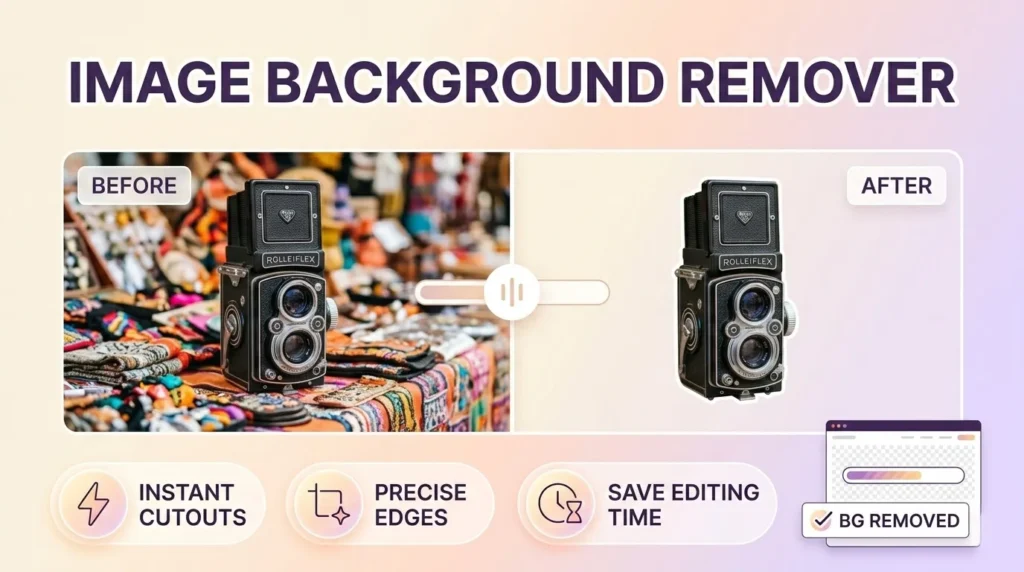
Use our Photo Background Remover to automatically delete image backgrounds in one click. Get clean, professional cutouts.
Use ToolMake websites more accessible with free online accessibility tools. Check contrast, validate HTML, test screen reader compatibility, and improve usability—all…
2 Tools
View ToolsExplore a collection of free AI tools designed to simplify tasks and boost productivity. From text generation and image creation…
10 Tools
View ToolsSave time with free bulk tools for mass processing tasks. Convert multiple files, generate multiple items, or analyze large data…
3 Tools
View ToolsSimplify your calculations with our free online calculator tools. From basic arithmetic to financial, scientific, and unit calculators, get accurate…
1 Tool
View ToolsConvert files, units, and media effortlessly with our free online conversion tools. Change PDFs to Word, images to different formats,…
8 Tools
View ToolsCreate professional-quality designs easily with our free online design tools. Design logos, posters, banners, thumbnails, and social media graphics—all in…
7 Tools
View ToolsAccess a collection of free developer tools online to streamline coding, debugging, and web development. Format code, test APIs, validate…
8 Tools
View ToolsQuickly generate dummy data for testing and development with free online tools. Create random names, emails, text, or numbers—all browser-based…
1 Tool
View ToolsSimplify email management with free online email tools. Generate temporary emails, validate addresses, or format messages—all fast, secure, and browser-friendly.
3 Tools
View ToolsHave fun online with free entertainment tools. Generate random names, create memes, pick lottery numbers, or design avatars—fast, browser-based, and…
1 Tool
View ToolsEnhance your Free Fire gaming experience with our free online Free Fire tools. From stats trackers to in-game utilities, our…
2 Tools
View ToolsFormat text, code, or data quickly with free online formatting tools. Beautify code, clean text, or structure data—all fast, browser-based,…
1 Tool
View ToolsEdit, convert, and optimize images online with our free image tools. Resize, compress, crop, remove backgrounds, and convert images between…
5 Tools
View ToolsDiscover the best keywords for your website, blog, or online business with free keyword research tools. Analyze search volume, competition,…
1 Tool
View ToolsBoost your website authority with free off-page SEO tools. Check backlinks, monitor domain authority, and analyze link profiles—all online, secure,…
10 Tools
View ToolsImprove your website’s search engine performance with free on-page SEO tools. Analyze content, meta tags, headings, and keywords directly in…
16 Tools
View ToolsBoost your productivity with our free office tools. Create notes, generate QR codes, check word counts, format text, and manage…
6 Tools
View ToolsProtect your data with free online security and privacy tools. Generate strong passwords, encrypt text, validate emails, and keep your…
1 Tool
View ToolsBoost your website’s visibility and rankings with our free SEO tools. Analyze keywords, check backlinks, audit pages, and optimize meta…
17 Tools
View ToolsManage, optimize, and grow your social media presence with free online tools. Schedule posts, generate content, analyze performance, and track…
4 Tools
View ToolsSimplify text editing and formatting with our free online text tools. Analyze, convert, clean, or transform text easily—all browser-based, fast,…
4 Tools
View ToolsDiscover a wide range of free online tools designed to make everyday tasks easier. From text and image utilities to…
21 Tools
View ToolsCreate, design, and optimize websites with free web designer tools. Generate mockups, test colors, resize images, and more—all fast, browser-based,…
15 Tools
View ToolsEnsure your website performs at its best with free web testing tools. Check speed, mobile-friendliness, accessibility, SEO, and more—all online,…
6 Tools
View ToolsEnhance your YouTube experience with free online tools. Download videos, analyze channels, create thumbnails, and manage content effortlessly. All browser-based,…
5 Tools
View ToolsCreate unique and creative names effortlessly with free online name generator tools. Generate names for businesses, games, social media, brands,…
5 Tools
View ToolsHave you ever spent hours staring at two nearly identical documents, trying to spot a single changed sentence? Or perhaps you are a developer hunting for a missing semicolon in two versions of a code block? The human eye is terrible at “spot the difference” puzzles when it comes to dense text—but computers excel at it.
Welcome to the ToolsInFree Text Difference Checker (also known as a Diff Checker). This is your essential, free online tool for instantly comparing two pieces of text side-by-side. We highlight every insertion, deletion, and modification in clear, color-coded visuals, so you can see exactly what changed in milliseconds.
Whether you are checking for plagiarism, reviewing code commits, or auditing legal contracts, our text compare tool ensures you never miss a single edit.
In professional and academic environments, “version control” is critical. Working on a document that has gone through multiple rounds of edits without tracking changes can lead to disaster.
Human Error: It is scientifically proven that the brain “autocorrects” what it reads. You might read a sentence three times and still miss a typo or a subtle word change that alters the meaning.
Time Drain: Manually reading two 1,000-word documents to find three small changes is an incredibly inefficient use of time.
Code Breakers: For programmers, a single character difference (like a { instead of a () breaks the entire application. These are nearly impossible to spot by scanning.
Our online diff tool automates this process. It aligns the two texts—the “Original” and the “Modified”—and performs a character-by-character or line-by-line analysis. It then generates a visual map of the differences, allowing you to validate changes with 100% accuracy in seconds.
We have designed this tool to be the most user-friendly and accurate text compare utility on the web.
We don’t just tell you the text is different; we show you how.
Red Highlights: Indicate text that has been deleted or removed from the original version.
Green Highlights: Indicate text that has been inserted or added to the new version.
Modified Lines: Often shown in yellow or blue, indicating a line where content was swapped. This intuitive visual system allows you to understand the scope of edits at a glance.
Some tools only tell you if a paragraph changed. Our tool goes deeper.
Line Mode: Great for code and lists, showing which lines were added or removed.
Character Mode: Perfect for prose and essays, highlighting specific typos or single-word changes within a sentence.
Our tool is text-agnostic. It works perfectly with:
Plain Text: Essays, articles, emails, and blog posts.
Source Code: HTML, CSS, JavaScript, Python, PHP, JSON, and more.
Data Lists: CSV data, name lists, or inventory logs.
Your data is sensitive. Whether it’s proprietary code or a confidential legal agreement, you don’t want it stored on a server. Our Text Difference Checker processes the comparison primarily in your browser. We do not store or save the text you compare. Once you close the tab, the data is gone.
Detecting changes requires no software installation or technical skills. Just follow these three steps:
Locate the left-hand text box labeled “Original Text” (or Version A).
Copy the older version of your document or code.
Paste it directly into this box.
Locate the right-hand text box labeled “Modified Text” (or Version B).
Copy the newer, edited, or updated version of the content.
Paste it here.
Hit the “Find Difference” or “Compare” button.
The tool will instantly render the results. Scroll through the output to see the highlighted changes. You can often toggle between a “Side-by-Side” view (best for code) or an “Inline” view (best for articles).
You might be surprised by how many professionals rely on diff checkers daily.
This is the primary tool for debugging.
Code Merging: Before merging a branch in Git, developers paste snippets here to see exactly what lines of code were altered.
Minified Files: Compare a minified JS file against a backup to see if corruption occurred.
Config Files: Check what changed in a server configuration file that caused a crash.
Proofreading: If an editor sends back a document without “Track Changes” enabled, use this tool to compare it against your draft to see exactly what they fixed.
Version Control: Compare “Draft_V1” and “Draft_V2” to ensure you didn’t accidentally delete a crucial paragraph.
SEO Updates: Compare an old blog post with a refreshed version to see how the keyword density and structure have shifted.
Contract Review: This is vital. If a counter-party sends back a signed contract, you must compare it against the original version you sent them to ensure they didn’t sneakily alter a clause or a number. A text difference checker protects you from fraud.
Policy Updates: Quickly identify what changed in a Terms of Service or Privacy Policy update.
Plagiarism Detection: While not a database search, teachers can compare a student’s essay against a source text to see if they just swapped a few synonyms (patchwriting).
Revision Tracking: Students can see how their essay has improved from the first draft to the final submission.
To get the best results, sometimes you need to clean your data.
If your text has erratic spacing, the diff checker might mark every line as different.
Use our Word Character Counter (Internal Link) or a text cleaner to normalize spaces before comparing to focus only on the content changes, not the formatting changes.
Why choose our tool over a desktop application like Notepad++ or a paid service?
Zero Installation: Access the tool from any computer, tablet, or phone with an internet connection. Useful when you are on a borrowed machine.
Clean Interface: No ads cluttering your view, no complex settings to configure. Just paste and compare.
Speed: Our algorithm is optimized for large text blocks, returning results instantly without page reloads.
A: Our tool is designed to handle large blocks of text. You can compare thousands of lines of code or long academic papers without issues. However, extremely massive files (like entire books) may be better split into chapters for browser performance.
A: This is a comparison tool, not a plagiarism database search. It compares Text A against Text B. It will tell you if they are identical or how much they overlap, which is useful if you know the source text you want to check against.
A: Currently, the tool is designed for instant, real-time analysis. We recommend taking a screenshot of the results if you need to send a “proof of change” to a colleague or client.
A: This is a text-based tool. To compare Word docs or PDFs, simply open your file, press Ctrl+A (Select All) and Ctrl+C (Copy), and then paste the text into our tool. This ensures the comparison focuses on the words, not the hidden file formatting.
Stop guessing what changed. Use the ToolsInFree Text Difference Checker now to gain 100% visibility into your edits and revisions!
