
The E-commerce Manager at 4:47 PM
Your supplier just sent a product SKU list as a jumbled column. You need it comma-separated for your Shopify
bulk upload. Instead of manually adding commas to 500 items, paste, click, export, and you’re home by 5.
Format text, code, or data quickly with free online formatting tools. Beautify code, clean text, or structure data—all fast, browser-based, and easy-to-use.
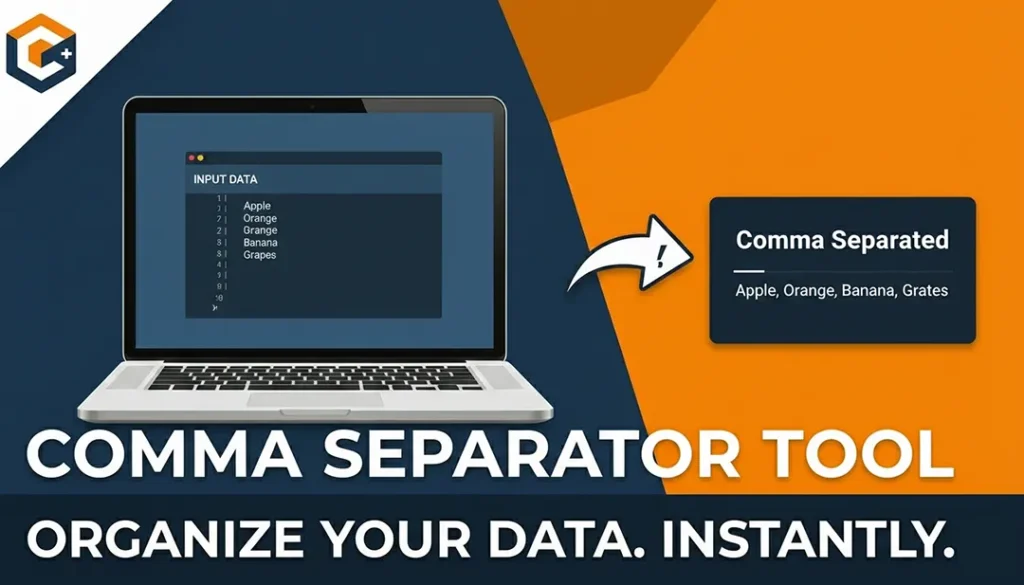
Use our free Comma Separator Tool to instantly add, remove, or format commas in text, lists, and numbers. Perfect for CSV files, spreadsheets, and data...
Use ToolDiscover a wide range of free online tools designed to make everyday tasks easier. From text and image utilities to…
17 Tools
View ToolsAccess a collection of essential web tools online. Convert files, test websites, compress images, and perform other web tasks—all free,…
16 Tools
View ToolsBoost your website’s visibility and rankings with our free SEO tools. Analyze keywords, check backlinks, audit pages, and optimize meta…
15 Tools
View ToolsCreate, design, and optimize websites with free web designer tools. Generate mockups, test colors, resize images, and more—all fast, browser-based,…
14 Tools
View ToolsImprove your website’s search engine performance with free on-page SEO tools. Analyze content, meta tags, headings, and keywords directly in…
14 Tools
View ToolsExplore a collection of free AI tools designed to simplify tasks and boost productivity. From text generation and image creation…
10 Tools
View ToolsBoost your website authority with free off-page SEO tools. Check backlinks, monitor domain authority, and analyze link profiles—all online, secure,…
10 Tools
View ToolsAccess a collection of free developer tools online to streamline coding, debugging, and web development. Format code, test APIs, validate…
8 Tools
View ToolsBoost your productivity with our free office tools. Create notes, generate QR codes, check word counts, format text, and manage…
6 Tools
View ToolsCreate unique and creative names effortlessly with free online name generator tools. Generate names for businesses, games, social media, brands,…
5 Tools
View ToolsEnsure your website performs at its best with free web testing tools. Check speed, mobile-friendliness, accessibility, SEO, and more—all online,…
5 Tools
View ToolsEnhance your YouTube experience with free online tools. Download videos, analyze channels, create thumbnails, and manage content effortlessly. All browser-based,…
5 Tools
View ToolsConvert files, units, and media effortlessly with our free online conversion tools. Change PDFs to Word, images to different formats,…
5 Tools
View ToolsCreate professional-quality designs easily with our free online design tools. Design logos, posters, banners, thumbnails, and social media graphics—all in…
5 Tools
View ToolsSimplify text editing and formatting with our free online text tools. Analyze, convert, clean, or transform text easily—all browser-based, fast,…
4 Tools
View ToolsManage, optimize, and grow your social media presence with free online tools. Schedule posts, generate content, analyze performance, and track…
4 Tools
View ToolsSave time with free bulk tools for mass processing tasks. Convert multiple files, generate multiple items, or analyze large data…
3 Tools
View ToolsEdit, convert, and optimize images online with our free image tools. Resize, compress, crop, remove backgrounds, and convert images between…
3 Tools
View ToolsSimplify email management with free online email tools. Generate temporary emails, validate addresses, or format messages—all fast, secure, and browser-friendly.
3 Tools
View ToolsMake websites more accessible with free online accessibility tools. Check contrast, validate HTML, test screen reader compatibility, and improve usability—all…
2 Tools
View ToolsEnhance your Free Fire gaming experience with our free online Free Fire tools. From stats trackers to in-game utilities, our…
2 Tools
View ToolsDiscover the best keywords for your website, blog, or online business with free keyword research tools. Analyze search volume, competition,…
1 Tool
View ToolsHave fun online with free entertainment tools. Generate random names, create memes, pick lottery numbers, or design avatars—fast, browser-based, and…
1 Tool
View ToolsProtect your data with free online security and privacy tools. Generate strong passwords, encrypt text, validate emails, and keep your…
1 Tool
View ToolsSimplify your calculations with our free online calculator tools. From basic arithmetic to financial, scientific, and unit calculators, get accurate…
1 Tool
View ToolsQuickly generate dummy data for testing and development with free online tools. Create random names, emails, text, or numbers—all browser-based…
1 Tool
View ToolsAt its core, this tool is your data’s universal translator. It takes information crammed into rows and columns
and converts it into clean, properly separated lists. Think of it as the Switzerland of spreadsheet
tools—neutral, efficient, and compatible with everyone.
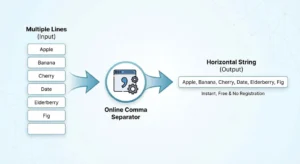
Here’s the simple magic behind Free comma separating tool
No downloads. No sign-ups. No “freemium” traps. Just clean data in seconds.
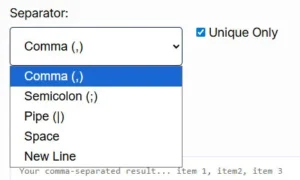
Remember that <select> element? That’s where the real power lives. Each option solves a
specific headache:
Your supplier just sent a product SKU list as a jumbled column. You need it comma-separated for your Shopify
bulk upload. Instead of manually adding commas to 500 items, paste, click, export, and you’re home by 5.
Client sends you 1,200 email addresses in a Word document, one per line. Your CRM needs them comma-separated.
Our tool converts the entire list before your coffee gets cold.
Qualitative responses exported from SurveyMonkey are impossible to analyze. Convert those paragraph responses
into a pipe-delimited format for proper qualitative analysis software.
A SQL query returned data in the wrong format. Rather than rewriting your query, copy the column and
transform it into the exact format your API endpoint expects.
Professor wants your references as a semicolon-separated list. Your bibliography is currently a vertical
column in Google Sheets. One paste later, you’re back to Netflix.
We checked out the tools currently dominating “comma separator online” searches. Here’s what they’re missing that
we nailed:
=UNIQUE()While Competitor X makes you click through three pages and Competitor Y hits you with a paywall after 100 lines,
we stay out of your way. That’s not just user-friendly—that’s respect.
Look, we know you found us by typing things like “remove commas online instantly,” “convert column to comma
separated list,” or “free delimiter tool.” Maybe you even searched “Excel column to comma separated list” or
“online CSV formatter.”
Things we serve better than anyone:
If your data has weird spaces or invisible characters, paste it into Notepad first, then into our tool. It
removes 90% of “why doesn’t this work” issues.
Sending email campaigns? Always check “Unique Only” to avoid duplicate sends and spam complaints. One click
saves your sender reputation.
Accidentally merged cells you shouldn’t have? Use the New Line option to restore vertical structure before
reformatting correctly.
Behind the scenes, the tool uses simple but elegant JavaScript: split() functions based on
\r\n or \n for line breaks, then join() with your selected delimiter. The
“Unique Only” feature runs a quick filter through a Set object—modern, fast, and browser-based. Your data never
touches our server; everything happens client-side for security.
A: Completely. No limits, no watermarks, no “upgrade to Pro” pop-ups.
A: We’ve tested up to 50,000 lines. Beyond that, your browser might hiccup, but give it a shot.
A: Use the semicolon or pipe delimiter instead—that’s exactly what they’re for.
A: Excel buries that feature 4 clicks deep. Our tool is faster, works on any device, and doesn’t require
Microsoft Office.
A: Nope. Everything happens in your browser. We couldn’t see your list if we tried.
Every minute spent manually adding commas is a minute you could spend on work that actually matters. Whether
you’re prepping a marketing campaign, cleaning survey data, or just trying to get home before rush hour, this
tool exists to make your life easier.
Try it now. Paste something. Be amazed. Get on with your day.