
Stop Guessing: Check Your Website’s Health with Our Free URL Status Code Checker
Every link on your website—and every link to your website—tells a story to search engines and your
visitors. That story is communicated through a small, three-digit number: the HTTP status code. A
healthy website operates like a well-oiled machine, signaling a 200 OK for
pages that exist and clear, efficient redirects for pages that have moved.
Ignoring these codes can lead to significant problems: broken links (404s) frustrate users, redirect loops (3xx) confuse search engine crawlers, and server errors (5xx) can completely drop your pages from search results. Our Url Status
Code Checker is designed to quickly scan up to 100 URLs at once, giving you an immediate,
comprehensive report on your website’s structural integrity and saving you countless hours of manual
checking.
Why Status Codes Are Non-Negotiable for SEO and User Experience
A status code isn’t just a technical detail; it’s a critical component of your site’s SEO performance and
visitor retention.
Preventing SEO Downfall
Search engines like Google use codes to determine how they should treat a URL. A recurring pattern of 404 or 500 errors tells a search engine that
your site is unreliable, leading to decreased crawl efficiency and, ultimately, lower rankings. Furthermore,
a permanent redirect (301) is necessary to correctly pass link equity (or
“link juice”) from an old URL to a new one. Using the wrong code, like a temporary redirect (302), can cause you to lose valuable ranking power.
Boosting User Trust and Retention
Imagine clicking a link on your site and landing on a generic “Page Not Found” error. It’s a frustrating
experience that erodes trust. By regularly using a Bulk URL Redirect Checker, you ensure every click
leads to the expected destination. Fewer dead ends mean happier visitors who stay longer, explore more, and
are more likely to convert.
Understanding the Key HTTP Status Code Families
While there are dozens of different codes, they all fall into five main families. Our URL Status Code
Checker focuses on the most critical ones that impact website health:
| Code Range | Meaning | Impact on Website |
|---|---|---|
2xx |
Success (e.g., 200 OK) |
Good. The request was successful, and the page loaded correctly. This is the desired status for live content. |
3xx |
Redirection (e.g., 301 Moved Permanently) |
Important. The page has moved. This code should be used to permanently pass link equity and users to the new location. |
4xx |
Client Error (e.g., 404 Not Found) |
Bad. The page is missing, or the server couldn’t fulfill the request. Requires immediate attention to fix the broken link. |
5xx |
Server Error (e.g., 500 Internal Server Error) |
Critical. The server failed to fulfill a valid request. This points to a deeper issue, often related to hosting or site configuration. |
Focus on the Worst Offenders:
404 Not Found: A page that has been deleted or moved without a
redirect. Fix this with a301redirect to the most relevant live page.
(Internal Link Placeholder: Link to your Broken Link Checker Tool here).301 Moved Permanently: Essential for SEO when migrating content.
Use our tool to check for long redirect chains (multiple 301s in a row), which can slow down page
speed.
How Our Bulk URL Status Code Checker Streamlines Your Workflow
Our tool is designed for speed, accuracy, and ease of use, making complex auditing simple for SEO
professionals, web developers, and site owners.
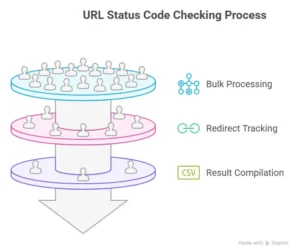
- Bulk Processing: Enter up to 100 URLs at once, separated by a new line. Perfect for
auditing newly migrated pages, large lists of backlinks, or full site sections. - Final Destination Tracking: Unlike basic checkers, our Url Status Code Checker
follows redirect chains, showing you the final URL where the link ends up, even if it goes through
multiple redirects. - Actionable Results: The clear, downloadable CSV report provides the original URL,
the HTTP status code, and the final destination URL, giving you all the data you need for your
maintenance plan.
Taking Action: Optimizing Your Site After Checking Codes
Finding errors is only the first step. Here is what to do with the insights from our Url Status Code
Checker:
- Address
404s(The Missing Links):- If the page has a relevant replacement, implement a
301
redirect. - If the page is old and irrelevant, you may choose to simply let the
404remain, but ensure your custom404page is helpful and guides users back to the main site.
(Internal Link Placeholder: Link to your Custom 404 Page Guide or similar content).
- If the page has a relevant replacement, implement a
- Clean Up Redirect Chains:
- If a page redirects from A -> B -> C, update the original link (A) to point directly to the
final destination (C). This eliminates unnecessary hops, improves speed, and makes life easier
for search crawlers.
- If a page redirects from A -> B -> C, update the original link (A) to point directly to the
- Resolve
5xxErrors Immediately:- A
5xxerror means your website is inaccessible. Contact your
hosting provider immediately. If the error is persistent, it could signal a code error or an
overwhelmed server.
- A
Use our Url Status Code Checker now and keep your website running at peak performance. For a complete
technical reference on all HTTP codes, you can consult external resources like the official MDN Web Docs on HTTP Status Codes (External Link).